
Skincare in Closie Plus
A skincare routine app for the products you already own
Skincare in Closie sits right next to your wardrobe. You add the products you already have, and Closie turns them into a morning and night plan, keeps track of use-by dates after opening and packs your toiletry bag for trips. No “good” or “bad” labels and no promises to fix your skin: it is about order, not diagnosis.
- Add products by barcode or photo
- Morning and night plan
- Use-by date after opening (PAO)
- Part of Closie Plus, not a medical device
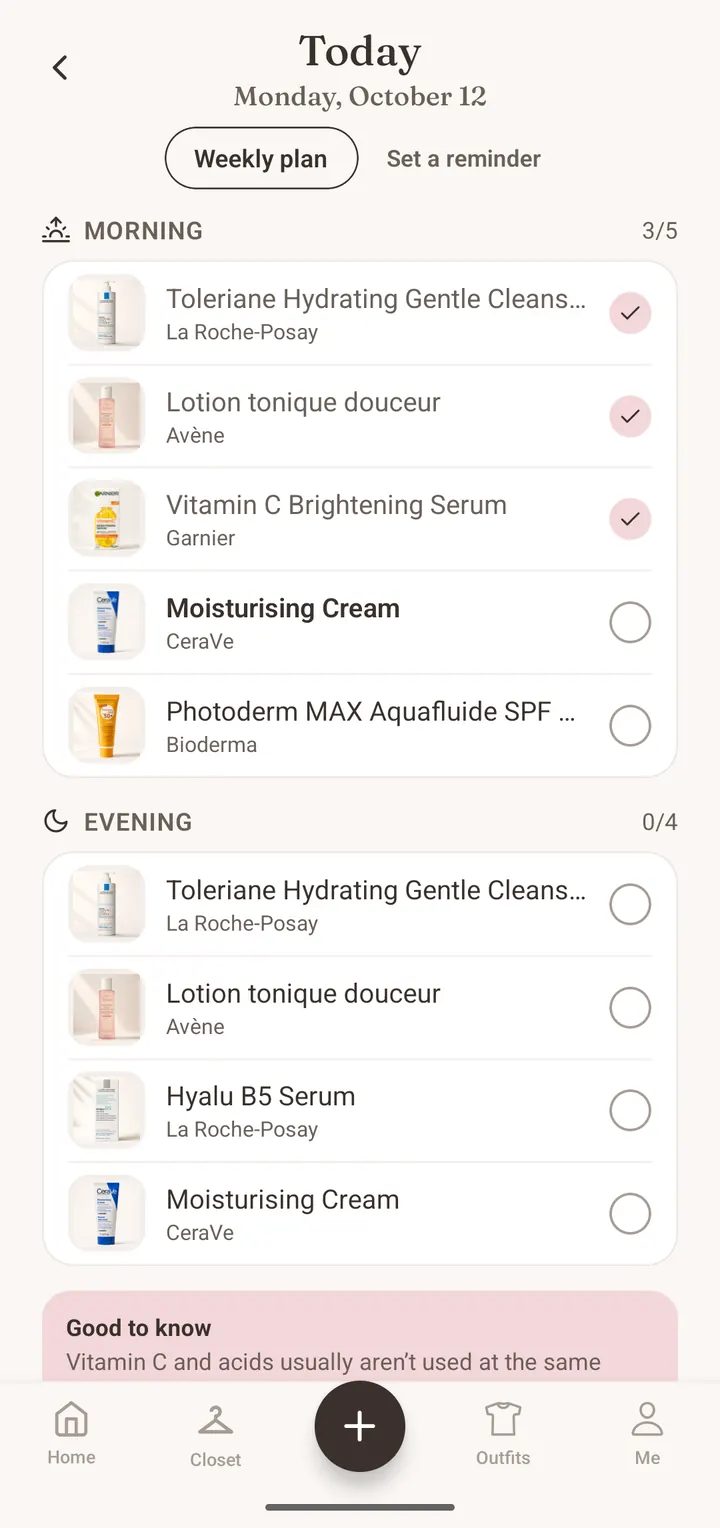
Your product shelf: scan a barcode or take a photo
It starts with the shelf: a list of the products that are actually in your bathroom. Scan a barcode and Closie looks the product up in its own catalogue and in the open Open Beauty Facts database. If it is not there, or the pack has no barcode, take a photo of the label: AI reads the name, brand and ingredients, and you just check them. Data from the database and from labels can be incomplete, so you can always edit it. A few minutes later you can see your whole routine in one place, including the jar that has been hiding at the back of the drawer.
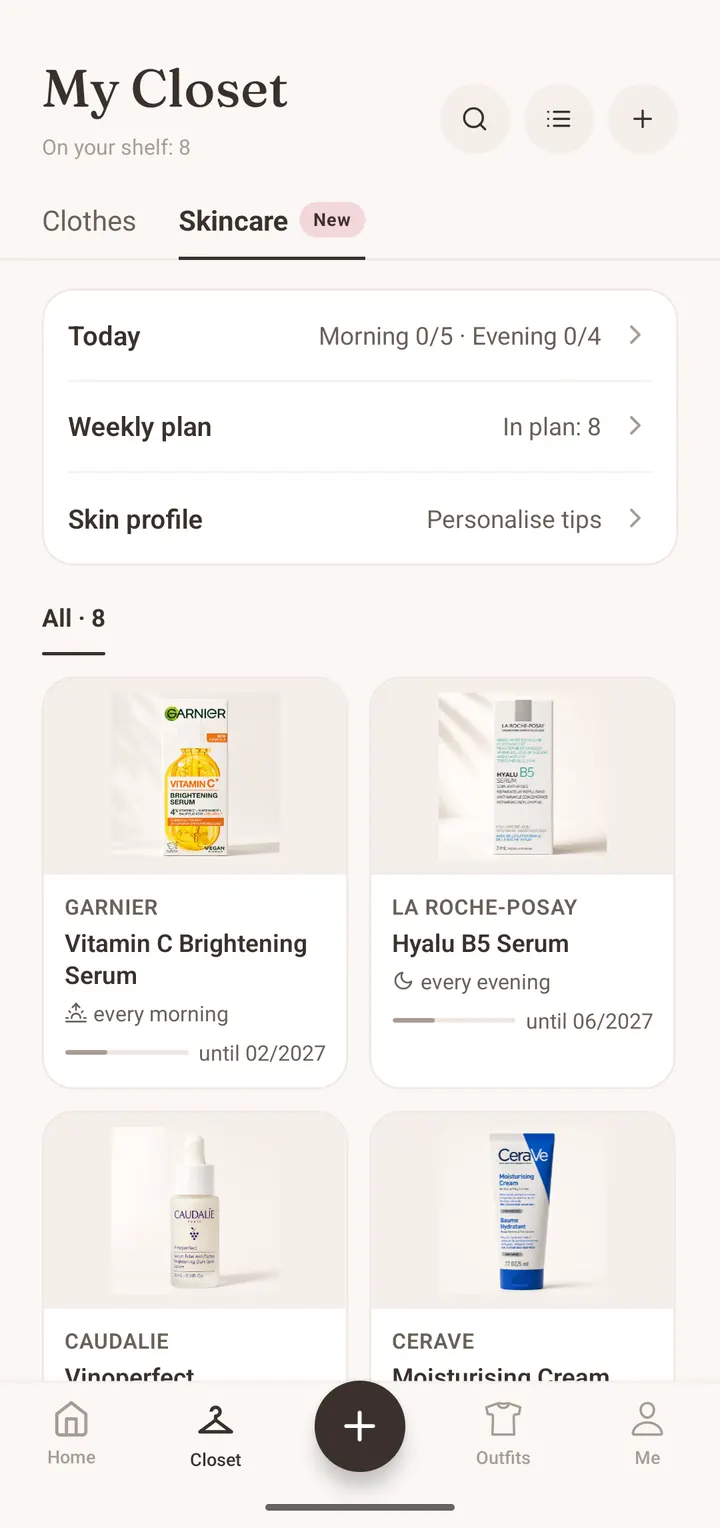
A morning and night routine, planned across the week
For each product you set how often you use it: every morning, every night or, say, twice a week. Closie builds today’s plan from that, plus a weekly plan that spreads masks and exfoliants across different days instead of stacking them on one evening. Your routine steps show up in the morning and evening outfit notification, so you do not need a separate reminder app. Tick off what you have done and that is it. If you are unsure about the order, the blog covers the general rule: thinnest texture to thickest, with sunscreen last in the morning.
- Today’s plan: morning and night steps from your own products
- Weekly plan: masks and exfoliants spread over the week
- Routine added to your morning and evening notification
Use-by dates after opening
Many products carry an open-jar symbol with a number of months, such as 12M. That is the PAO: how long the manufacturer recommends using the product once it is open. Hardly anyone remembers when they opened a moisturiser. In Closie you enter the opening date, and the app uses the PAO to estimate when to finish it and shows what runs out first. It is an estimate, not a guarantee, but it is enough to stop keeping a three-year-old serum. When you finish something, you tell Closie whether you would buy it again. If you would, it goes on your shopping list.
Ingredient facts, not verdicts
An ingredient list (INCI) can be long and hard to read. Closie shows simple facts for each product: whether it contains fragrance, which actives it has, and whether there is alcohol or essential oils. It does not label products good or bad, because what suits one person may not suit another. What you can do is mark ingredients you prefer to avoid, and Closie will highlight them in every list, including products you are thinking of buying. Your avoid list and skin profile stay on your phone only. Closie does not ask about your health, allergies or medication.
Toiletry bag for trips and Smart Buy for skincare
Skincare works with the trip planner. When you plan a trip, Closie takes the products from your routine for those days and builds your toiletry bag, with a note for carry-on luggage and a sunscreen reminder when the forecast says sun. Before buying something new, use Smart Buy to see whether you already own something similar and whether the ingredients include anything on your avoid list. It is the same feature that stops you buying a fourth black jumper, applied to your bathroom shelf.
What it costs and what it does not do
Skincare is part of Closie Plus, which costs $5.99 a month or $49.99 a year on the US App Store; other countries see their local price in their store. On the free plan you only see a preview. If your store offers it, the annual plan can start with a 7-day free trial. If your subscription ends, your products, plan and ticks stay in the app, but you cannot add new products. One important note: Closie Skincare is not a medical device. It does not analyse your skin or face, diagnose or treat anything. It helps you organise the products you already own. If you have a skin condition or allergy, or you are pregnant, ask a doctor, dermatologist or pharmacist about the products you use.
How to start your skincare plan in Closie
- 1
Download Closie and turn on Closie Plus
The app is free on iPhone and Android, and Skincare is part of Closie Plus.
- 2
Add products to your shelf
Scan the barcode or photograph the label, then check the name and ingredients.
- 3
Set how often you use them
Morning, night or a few times a week. Closie builds your daily and weekly plan.
- 4
Enter opening dates
Closie uses the PAO symbol to estimate when to finish each product and shows what runs out first.
Skincare routine app: FAQ
Is the Closie skincare routine app free?
Closie itself is free to download, but Skincare is part of Closie Plus ($5.99 a month or $49.99 a year on the US App Store). The free plan shows a preview. The annual plan can start with a 7-day free trial if your store offers it.
How do I add a product without a barcode?
Take a photo of the packaging. AI reads the name, brand and ingredients from the label, and you check and correct them if needed. Keep faces out of the photo: if there is a face in the frame, Closie will not read the label.
How does Closie know when an opened product expires?
From the PAO symbol on the pack (the open jar with a number of months) and the opening date you enter. Closie uses both to estimate a use-by date. It is an estimate, not a guarantee, so also go by smell, texture and the manufacturer’s instructions.
Will Closie tell me if a product is good for my skin?
No. Closie shows ingredient facts, such as fragrance, alcohol, essential oils or actives, and highlights anything on your avoid list. It does not rate products as good or bad and does not analyse your skin. It is not a medical device.
Where is my skincare data stored?
Your skin profile and avoid list stay on your phone only. Your shelf, plan and ticks are stored on Closie’s servers, linked to your account, and deleted with it. Closie does not ask about health, allergies, pregnancy or medication.
What happens to my shelf if I cancel Closie Plus?
Your products, routine and ticks stay in the app. Once the subscription ends you cannot add new products or scan more labels. Your wardrobe, outfits and the rest of the free plan keep working.
Organise the products you already own
Download Closie, turn on Closie Plus and add your bathroom shelf. Your morning and night plan builds itself.
Free on iPhone and Android · No card needed